
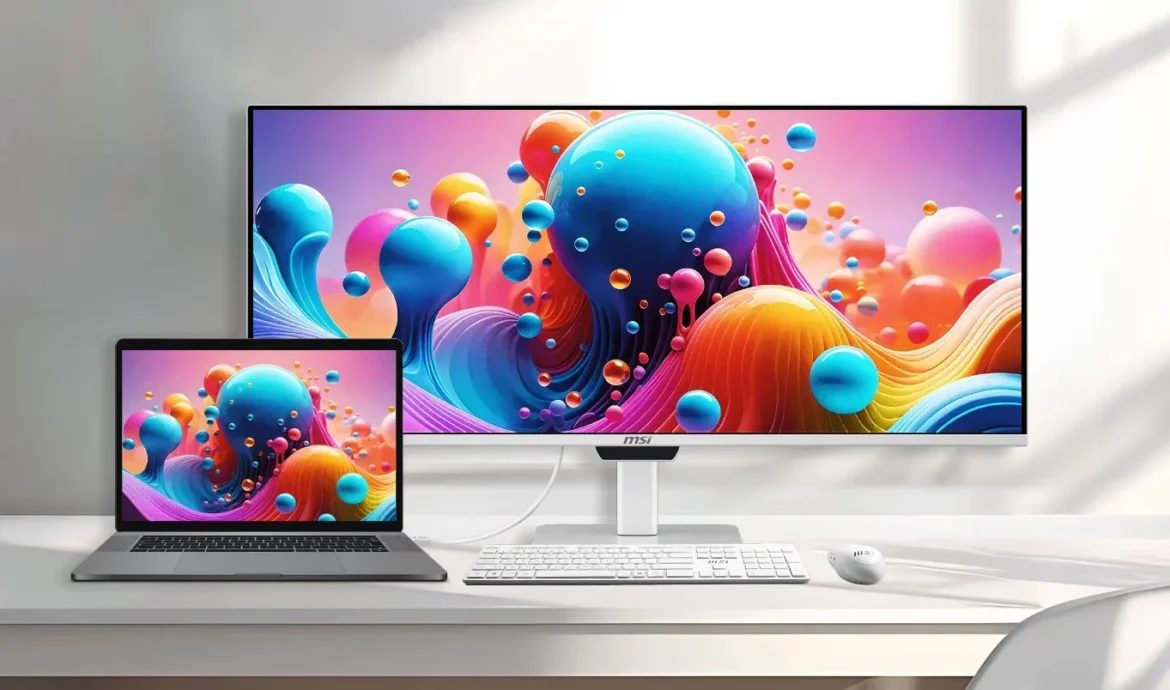
For years, a persistent pain point for Apple Mac users utilizing external desktop monitors has been the cumbersome hardware interface required for basic adjustments. Unlike Apple’s proprietary displays or specialized third-party offerings, standard external monitors typically force users to fiddle with physical toggle buttons, rear-mounted joysticks, or complicated On-Screen Display (OSD) menus merely to alter display brightness or speaker volume. Recognizing this workflow friction, hardware giant Micro-Star International (MSI) has officially unveiled its latest display solution: the MSI PRO MAX ultrawide monitor. Designed from the ground up to bridge the gap between Windows-centric hardware and the macOS ecosystem, this monitor aims to deliver a native-like peripheral experience for creative professionals, developers, and power users who prefer Apple’s hardware architecture.
Background Context and Industry Evolution in Display Technology
The launch of the MSI PRO MAX arrives at a time of rapid evolution within the desktop monitor market, particularly concerning panel technology and cross-platform compatibility. Historically, the desktop monitor landscape was sharply divided. Monitors optimized for high refresh rates and deep contrast ratios were marketed almost exclusively toward Windows PC gamers, often ignoring the unique color science workflows, scaling preferences, and control behaviors demanded by macOS users. Conversely, monitors built specifically for the Mac ecosystem—typified by high pixel densities and deep system-level integration—frequently commanded exorbitant price points and lacked gaming-grade refresh rates.
Over the past several years, Quantum Dot Organic Light Emitting Diode (QD-OLED) technology has emerged as the gold standard for visual fidelity, offering infinite contrast ratios, near-instantaneous pixel response times, and expansive color gamuts. However, early iterations of QD-OLED panels suffered from specific drawbacks, most notably text clarity issues caused by unconventional sub-pixel layouts. These technical hurdles frustrated office workers and text-heavy professionals, who experienced color fringing around small typography. By introducing refined sub-pixel configurations and targeting cross-platform utility, MSI’s new offering represents a strategic push to capture the lucrative high-end professional market that bridges creative macOS workflows with immersive entertainment.
Core Technical Specifications and Visual Performance
At the heart of the MSI PRO MAX is a 34-inch QD-OLED panel featuring a cinematic 21:9 aspect ratio and an ultra-wide WQHD resolution of 3440 x 1440 pixels. The display operates at a maximum refresh rate of 144 Hz, ensuring buttery-smooth motion rendering whether users are navigating the macOS desktop interface, scrubbing through high-framerate timeline footage, or engaging in casual gaming sessions.
Despite the stellar performance characteristics of its QD-OLED substrate, industry analysts note a distinct compromise regarding pixel density. With a resolution of 3440 x 1440 spread across a 34-inch diagonal canvas, the pixel density sits at approximately 110 pixels per inch (PPI). While completely adequate for general productivity and media consumption, this figure falls noticeably short of Apple’s legendary Retina display standards, which typically exceed 200 PPI on laptops and specialized desktop displays. Consequently, Mac users accustomed to microscopic text rendering and ultra-sharp UI scaling may notice a slight drop in crispness compared to native Apple panels.

To combat legacy complaints regarding text clarity, MSI has incorporated an advanced RGB stripe sub-pixel layout into the PRO MAX panel. This engineering adjustment systematically mitigates the color fringing artifacts that plagued early-generation triangular sub-pixel QD-OLED monitors, rendering razor-sharp text reproduction suitable for long hours of coding, document editing, and web browsing.
Color reproduction is another critical pillar of the PRO MAX’s value proposition. MSI reports factory calibration resulting in a color accuracy metric of Delta E less than 2, ensuring reliable out-of-the-box performance for color-sensitive workflows. The display boasts expansive gamut coverage, achieving 99 percent of the cinematic DCI-P3 color space and 97.4 percent of the Adobe RGB standard. For High Dynamic Range (HDR) content creation and consumption, the monitor is rated to peak at a dazzling 1,300 nits on localized highlights, while full-field Standard Dynamic Range (SDR) brightness reaches a stable 300 nits, making it exceptionally well-suited for controlled studio environments and modern office spaces.
Seamless macOS Integration: Solving the Hardware Control Bottleneck
The defining characteristic of the MSI PRO MAX—and its primary differentiator in a crowded ultrawide market—is its sophisticated approach to software-level compatibility with Apple hardware. Historically, connecting a non-Apple monitor to a Mac book or Mac mini severed the ability to control display brightness and audio output via the computer’s native keyboard function keys or Control Center sliders. Users were forced to rely on third-party software utilities, which were often unreliable across software updates, or resort to manual tactile inputs on the monitor chassis.
MSI has engineered the PRO MAX firmware to natively communicate with connected Mac systems. Through standard display protocols and optimized firmware design, users can effortlessly adjust both screen luminance and speaker volume directly from macOS interface controls. This deep integration drastically streamlines the daily user experience, removing unnecessary physical friction and allowing the display to behave more like a first-party Apple peripheral while retaining the sprawling canvas of a 34-inch ultrawide monitor.
Comprehensive Connectivity and Ergonomic Versatility
Modern professional workspaces demand robust connectivity options capable of handling power delivery, high-bandwidth video transmission, and peripheral management through a single cable interface. The MSI PRO MAX addresses these needs through an exhaustive selection of ports. The rear I/O panel houses two HDMI 2.1 ports and one DisplayPort 1.4a input, ensuring broad compatibility with a wide array of host systems, gaming consoles, and workstations.
Furthermore, the monitor features dual USB-C ports with support for DisplayPort Alt Mode. One of these ports is engineered to deliver up to 98W of Power Delivery (PD), capable of simultaneously charging power-hungry MacBook Pro models at full speed while transmitting high-resolution display signals. The secondary USB-C port provides an additional 15W of power for smaller accessories or mobile devices.

Additional peripheral expansion includes a USB Type-B 3.2 Gen 1 upstream port, four high-speed USB Type-A 3.2 Gen 2 downstream ports, and a standard 3.5mm audio jack for wired headphones or external desktop speakers. Built-in Keyboard, Video, Mouse (KVM) switch functionality supports up to three distinct host devices, empowering professionals to seamlessly toggle a single keyboard and mouse setup across multiple computers—such as a personal Mac, a work MacBook, and a Windows desktop rig—without constantly unplugging cables.
Aesthetically and physically, the monitor is styled in a clean, professional white chassis designed to complement modern minimalistic desk setups. Built-in dual 3W stereo speakers provide baseline audio capabilities for casual media consumption, while hardware-level blue light reduction technology safeguards user eye health during extended work sessions. The included ergonomic stand offers robust adjustment parameters, featuring up to 130mm of height adjustment, 30 degrees of swivel capability, 10 degrees of pivot rotation, and a tilt range spanning from -5 to 20 degrees. For users with specialized desk layouts or mounting arms, standard VESA mounting compatibility is also fully integrated.
Market Implications and Industry Outlook
The launch of the MSI PRO MAX signals a broader industry recognition that peripheral manufacturers can no longer ignore the massive demographic of creative professionals embedded within the Apple ecosystem. By combining cutting-edge QD-OLED visual technology with thoughtful software-level conveniences tailored explicitly to macOS workflows, MSI has created a compelling alternative to traditional professional displays.
From an analytical perspective, the success of the PRO MAX will likely depend heavily on its retail pricing strategy and consumer reception of its PPI limitations relative to traditional Retina panels. However, for users who prioritize the expansive multitasking real estate of a 34-inch ultrawide canvas, the elimination of hardware control frustrations represents a massive quality-of-life upgrade. As competition heats up in the high-end display sector, MSI’s cross-platform approach establishes a new benchmark for how third-party hardware manufacturers can successfully court the affluent and demanding Mac user base.
